Your Desktop.
Your Air Quality,
UV & Weather HUD.
A sunny day doesn't always mean safe air. For people living with asthma or allergies, outdoor runners timing their workouts, parents protecting young lungs, and anyone in regions impacted by wildfire smoke or urban smog, knowing real-time PM2.5, NO₂, O₃, AQI, and UV Index is essential. WeatherWidget Pro acts as an Always-On Desktop Air Quality & UV Monitor—floating effortlessly on your wallpaper across up to 5 cities.




Why What You Can't See in the Sky Matters Most
Standard weather apps tell you whether to grab an umbrella, but they rarely warn you about what you're breathing until you're already outside. Fine particulate matter (PM2.5) from distant wildfire smoke penetrates deep into the lungs and bloodstream. Rush-hour Nitrogen Dioxide (NO₂) and afternoon ground-level Ozone (O₃) trigger airway inflammation, while high UV Index levels cause rapid skin and eye damage even on cool, breezy afternoons.
Whether you live with asthma or allergies, lace up as an outdoor runner or cyclist, check conditions as a parent before sending kids out to play, or live in a city affected by wildfire plumes or urban smog, WeatherWidget Pro gives you an Always-On Desktop Air Quality & UV Monitor. With live color-coded AQI badges and pollutant telemetry right on your desktop wallpaper, you'll know the exact moment to open your windows for fresh air—or close them and switch on your HEPA filter.
App Interactive Showcase
Explore the application interface and transparent desktop overlay in Celsius, Fahrenheit, and localized language editions (including Chinese — 1 of 12 supported languages).
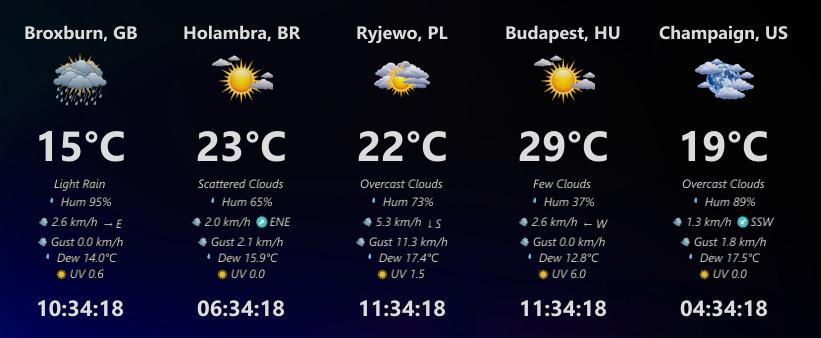
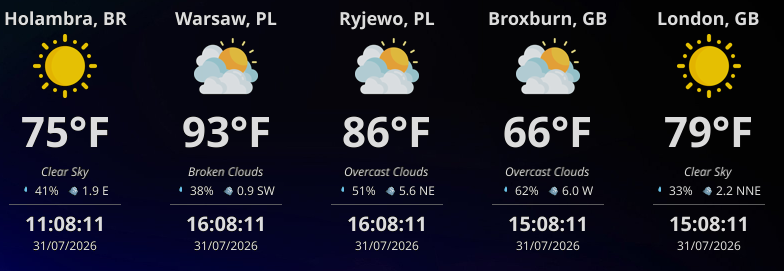
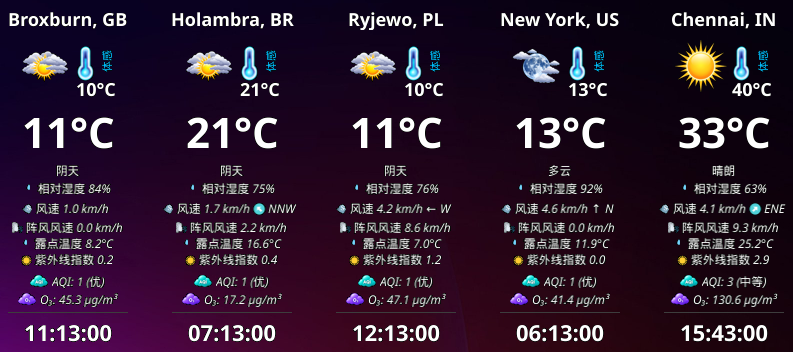
Want to see real desktop captures across Linux, macOS & Windows, or need configuration help?
Worldwide Weather Activity
Explore cities and regions actively querying live meteorological data through the WeatherWidget network.
Built with Care, Designed for Simplicity
A lightweight native core engine combined with an ultra-clean overlay dashboard interface.
Multi-City Support
Track weather updates for up to 5 cities simultaneously. Keep tabs on regional forecasts in a tidy grid.
Transparent Overlay
Sits elegantly on top of or behind window configurations. Adjustable transparency blends smoothly with any theme.
Lightweight & Native
Compiled natively in Go without Electron weight. Executes instantly under a tiny 20MB RAM signature.
Auto Refresh
Configure background refresh intervals from 1 to 60 minutes to automate forecast tracking data updates.
Customizable Data Panel
Choose exactly which data fields to show: City Name, Weather Icon, Temp, Description, Humidity, Wind, Time, Date, Wind Gust, Dew Point, Pressure & UV Index.
Privacy First
No analytics trackers, telemetry scripts, or account creation flows. Your setups belong strictly on your hardware.
Up and Running in Minutes
Three simple steps to establish dynamic weather and local time reporting on your desktop grid.
WeatherWidget
Elegant desktop utility tracking atmospheric data cleanly and efficiently.
Sleek Desktop Setup
Start tracking atmospheric forecasts without signing up or managing complex dashboard templates.
Install the App
Deploy WeatherWidget from the Microsoft Store, Snap Store, or download the release installer directly from GitHub.
Configure Locations
Add up to 5 city coordinates, configure measurement units, and select a background refresh timer.
Enjoy Borderless View
Double-click the tray icon to overlay the minimalist transparent widget flat onto your active monitor screen.
💡 Getting Started: Demo, Free or Pro
There are three ways to use WeatherWidget, depending on what you need.
Demo Mode
Instant test drive
Try the application with 3 predefined demo cities. These cities are fixed and cannot be changed in demo mode.
- Zero API key required
- 3 predefined demo cities
- Fixed cities (cannot be changed in demo mode)
Free Mode
Your own OpenWeatherMap API key
Configure your own 3 cities manually. This option is free, but doesn't include pollution and AQI information.
- Configure your own 3 cities manually
- Free personal OpenWeatherMap key
- Doesn't include pollution & AQI information
Pro
Always-On Desktop Air Quality & UV Monitor
Built for people with asthma, allergies, outdoor runners, parents, and anyone in wildfire smoke or urban smog zones. Pro transforms your desktop into an always-on health HUD tracking live PM2.5, NO₂, O₃, AQI, and UV Index across up to 5 cities with zero API key setup.
- Live PM2.5, PM10, NO₂, O₃, AQI & UV Index HUD
- Support for up to 5 cities simultaneously
- Instant city search & zero API key setup
💡 Start Your Way: You can start with the demo or free option and decide whether Pro suits your needs.
Monitor Your Atmosphere Today
Bring elegant atmospheric tracking and forecast modules cleanly to your workspace dashboard. Get WeatherWidget today.